Vitrine
A Platform for Collectors, Built End-to-End
01
The Problem
I was hired to redesign a consumer app. Vitrine — a digital cataloging platform for collectors — needed a facelift. New UI, cleaner flows, ship it.
That was the brief.
Once I got under the hood, it became clear the problems ran deeper than visual design. The app wasn't just dated — it was architecturally constrained.
The backend (Firebase) wasn't built to scale
Monetization limited to marketplace transactions — one revenue stream with no recurring component
Admin tooling was duct-taped together
A redesign wasn't going to fix this. The product needed to be rethought, not reskinned.
I went back to the client with a different proposal: let me rebuild the platform — product strategy, consumer app, admin tooling, backend migration, monetization model — at nearly the same cost as the original design contract.
They said yes.
- New visual design
- Cleaner flows
- Ship it
- Product strategy
- Native React Native app
- Backend migration (PostgreSQL)
- Monetization (Pro tier)
- Admin tools rebuild
02
Understanding the Domain
Before designing anything, I needed to understand how collectors actually think about their stuff.
Collectors don't just own things — they curate them.
The difference matters. Ownership is passive; curation is active. Collectors organize, categorize, display, compare, track, and talk about their collections constantly. The existing app treated collecting like inventory management. That misses the emotional and social dimensions entirely.
Two Worlds, One Platform
Vitrine serves two fundamentally different collector types. The previous app tried to force both into the same rigid structure. The rebuild needed to support both mental models within a unified experience.
Trading Cards
- • Standardized (sets, variants, print runs)
- • Grading is central (PSA, BGS, CGC)
- • Data is structured, verifiable
- • Value tied to condition + scarcity
Memorabilia
- • Unique (game-worn, signed, vintage)
- • Authentication varies
- • Data is custom, self-reported
- • Value tied to provenance + story
The Social Layer
The other thing the original app missed: collecting is inherently social. Collectors want to:
03
Design Principles
Based on the domain research, I established four principles to guide the rebuild:
Curation over inventory
The app should feel like building a gallery, not managing a warehouse. Display and organization are first-class features.
Collectors have emotional relationships with their items. The UX should reflect that.
Flexible structure
Support both standardized items (cards) and unique items (memorabilia) without forcing one model on the other.
Different collectors need different fields, workflows, and data structures.
Social by default
Discovery, tracking, and communication should be woven throughout — not siloed into a separate 'community' tab.
Collecting is social. The app should facilitate connection, not just storage.
Premium positioning
The visual language should feel elevated — modern, confident, polished.
Collectors take their hobby seriously. The app should match that energy.
| Principle | What It Means | Why It Matters |
|---|---|---|
| Curation over inventory | The app should feel like building a gallery, not managing a warehouse. Display and organization are first-class features. | Collectors have emotional relationships with their items. The UX should reflect that. |
| Flexible structure | Support both standardized items (cards) and unique items (memorabilia) without forcing one model on the other. | Different collectors need different fields, workflows, and data structures. |
| Social by default | Discovery, tracking, and communication should be woven throughout — not siloed into a separate 'community' tab. | Collecting is social. The app should facilitate connection, not just storage. |
| Premium positioning | The visual language should feel elevated — modern, confident, polished. | Collectors take their hobby seriously. The app should match that energy. |
04
The Solution
I designed and built three interconnected products: the consumer app, the marketing site, and the admin tooling (Category Builder). Each serves a different audience but shares a unified design language and data model.
4.1 Consumer App
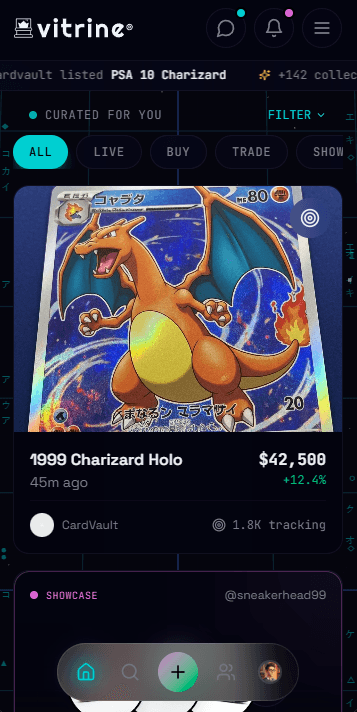
Home & Activity Feed
The home screen needed to serve two modes: personal (your collection, your activity) and discovery (what's happening in the broader community).
Personalized feed: "Curated for you" based on what you collect and track, with filters for intent (Buy, Trade, Show)
Live activity ticker: Real-time updates showing what other collectors are listing and tracking
Quick actions: Prominent add button for uploading new items without friction
Search & Discovery
Search is where collectors find things they don't already own — items to track, collectors to follow, communities to join.
Recent searches: Persistent, because collectors often search for the same things repeatedly
Category exploration: Visual entry points into major categories (Cards, Kicks, Watches, Sports)
Trending section: Real-time data on what's being searched, with velocity indicators (+284%, +156%)
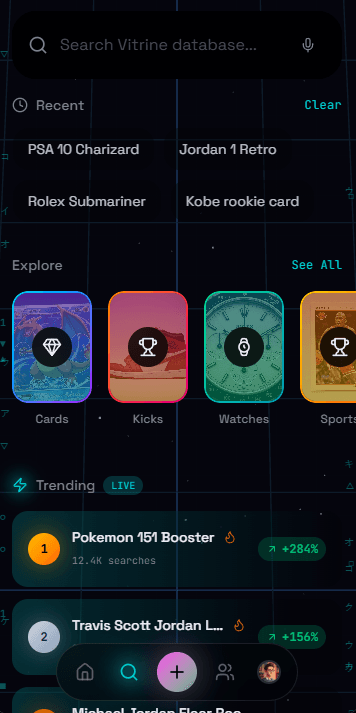
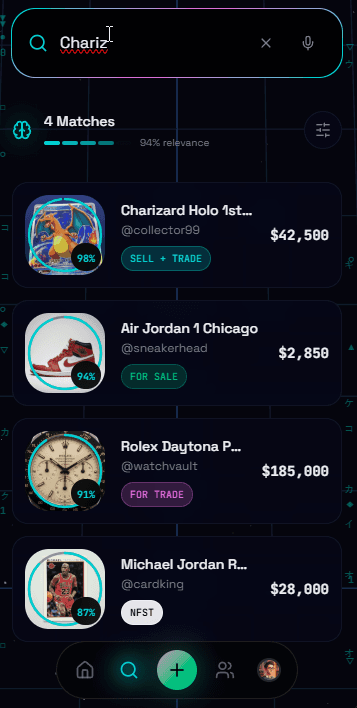
Left: Search landing surfaces trends and categories. Right: Results show relevance scoring and item status.
Upload Flow: The Fork
This is where the "two mental models" principle gets implemented. When adding a new item, users first choose their path:
Scan/auto-detect flow optimized for standardized items
Custom field flow for unique pieces
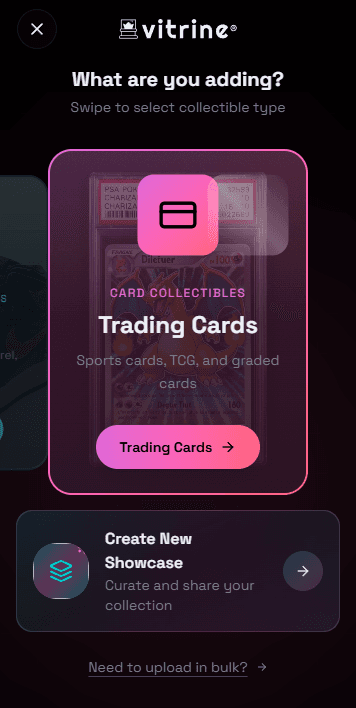
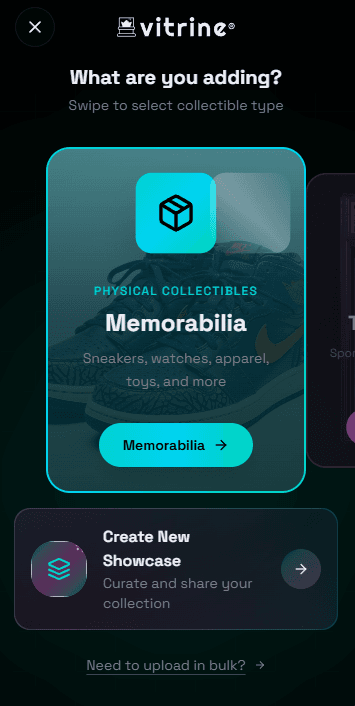
Swipeable type selection adapts the subsequent flow to the item type.
Upload Flow: Memorabilia Path
For memorabilia, the flow uses progressive disclosure through a clear hierarchy: Type → Category → Subcategory → Item Details. Each level narrows the context and determines which fields appear on the final form.
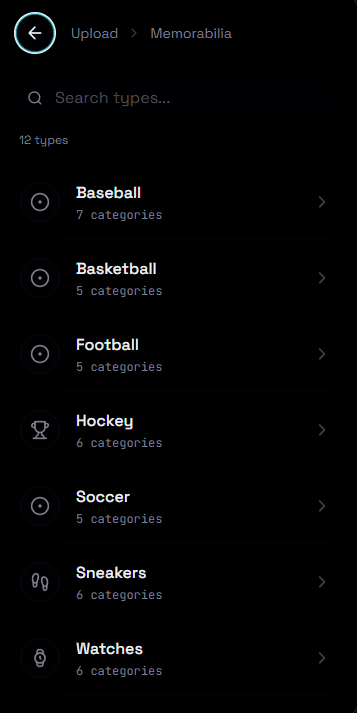
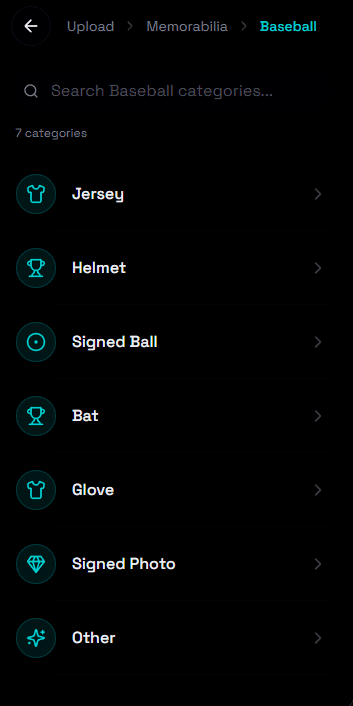
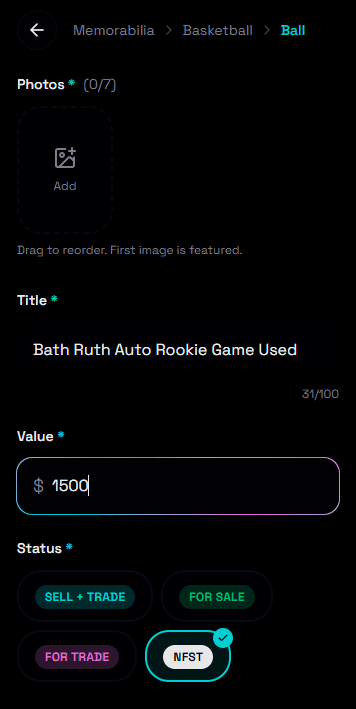
Progressive hierarchy: Type → Category → Item Details. Each level narrows context and adapts the form fields.
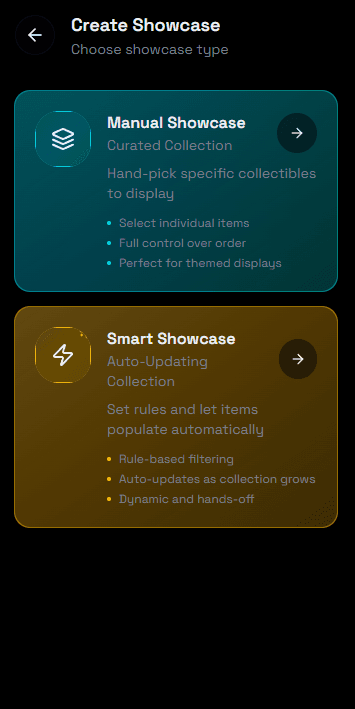
Showcases: Curated Collections
Showcases are the "curation over inventory" principle made tangible. They're subsets of your collection — themed, organized, and shareable.
Hand-pick specific items, control the order — perfect for "My Grails" or themed displays
Set rules, let items auto-populate (e.g., "All items over $500" or "All PSA 10s")
User Profiles
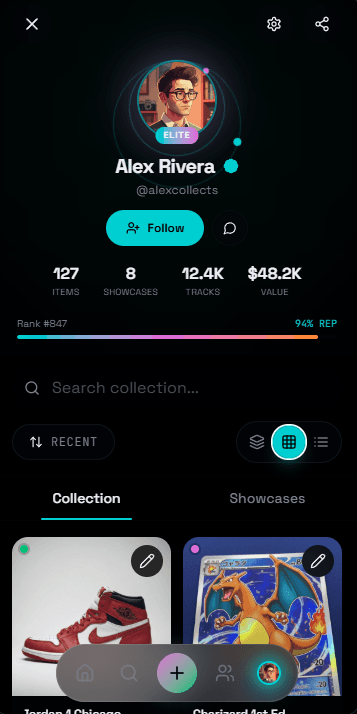
Profiles are where reputation lives. In collector communities, credibility matters — it affects whether people trust you enough to buy, sell, or trade.
Stats bar: Items, showcases, tracks, total value — social proof at a glance
Rank and reputation: Earned through activity and positive interactions
Elite badge: For verified serious collectors
Community & Messaging
Collecting is social. The app needed spaces for collectors to gather, discuss, and transact.
You can attach collectibles directly to messages. Not screenshots. Not links. The actual item from your catalog, with all its metadata. This is how collectors should talk.
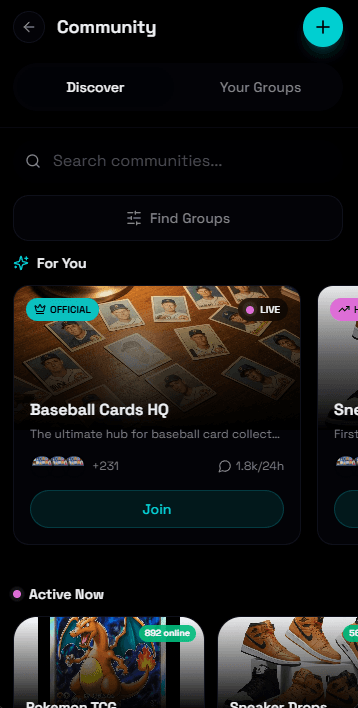
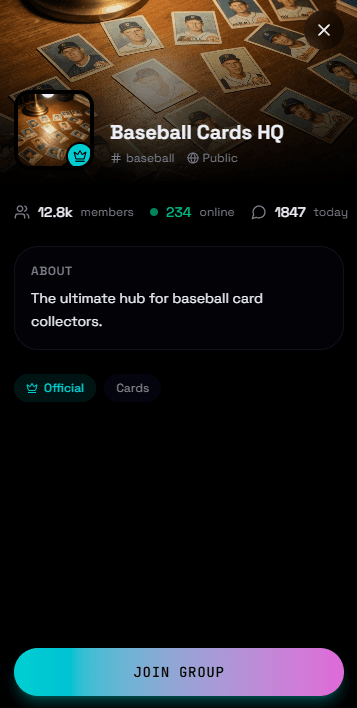
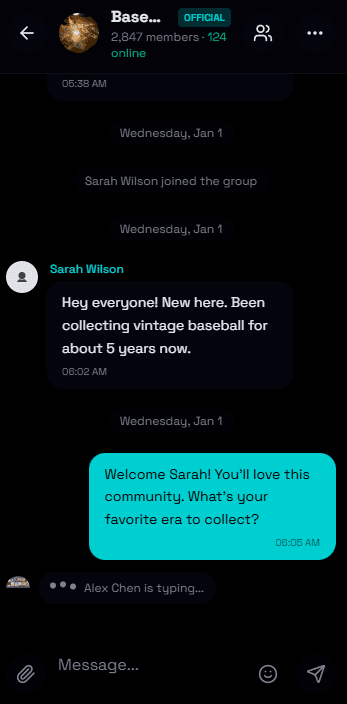
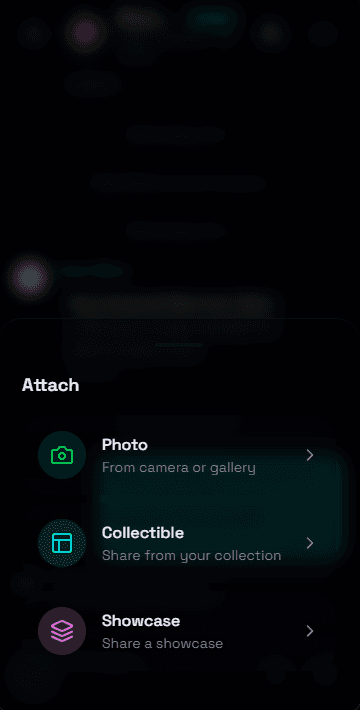
Community flow: Discover → Join → Chat → Share collectibles directly in conversation.
4.3 Admin PWA
Category Builder
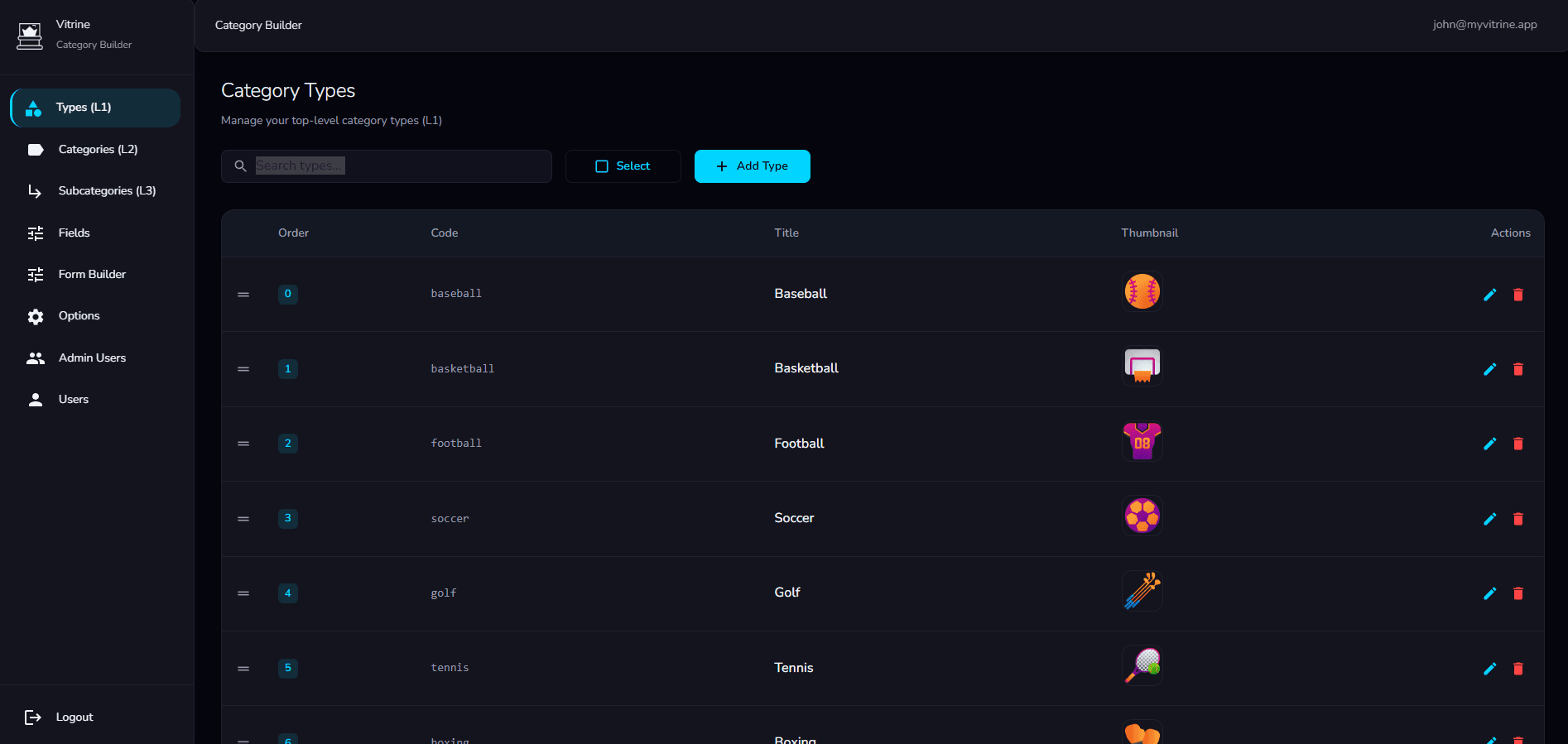
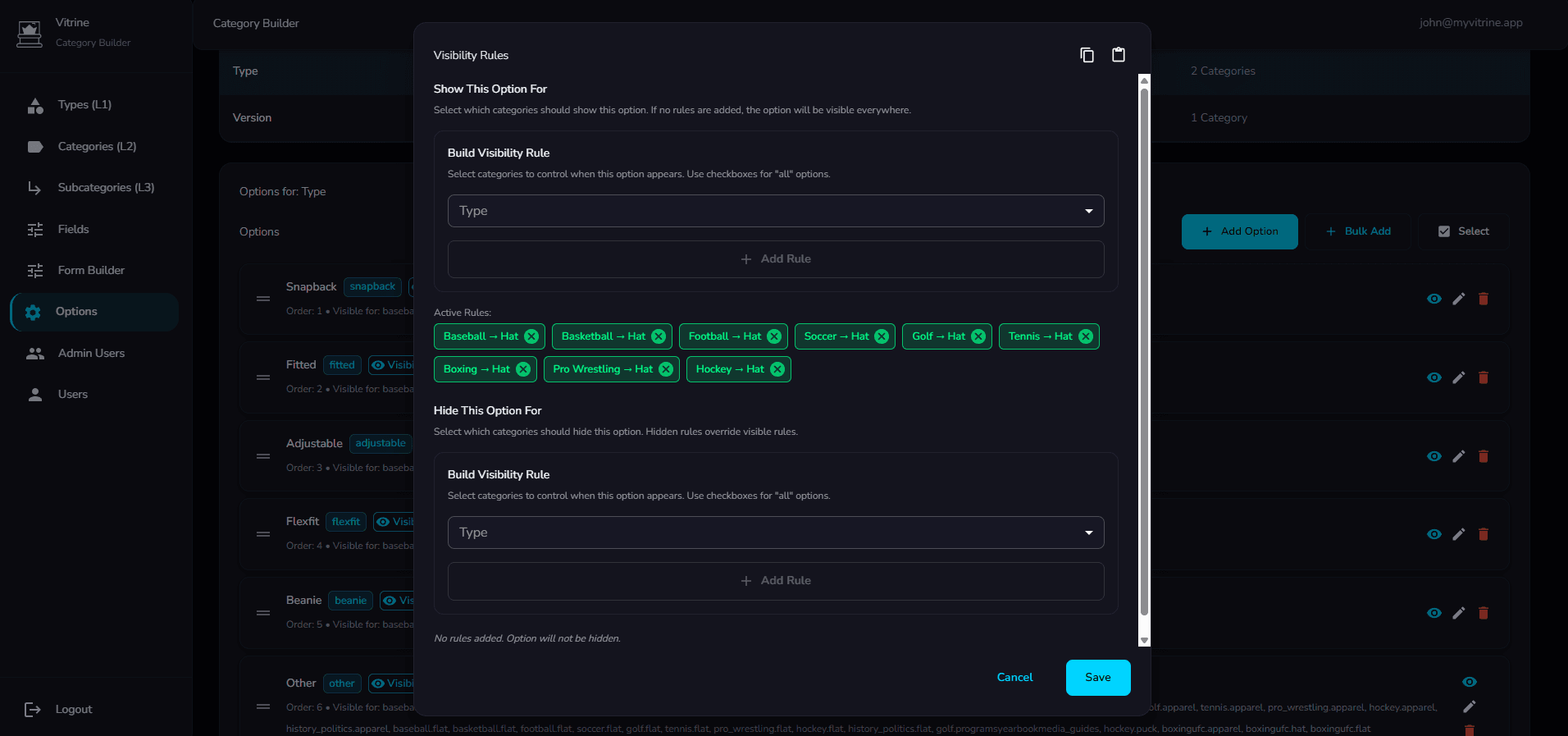
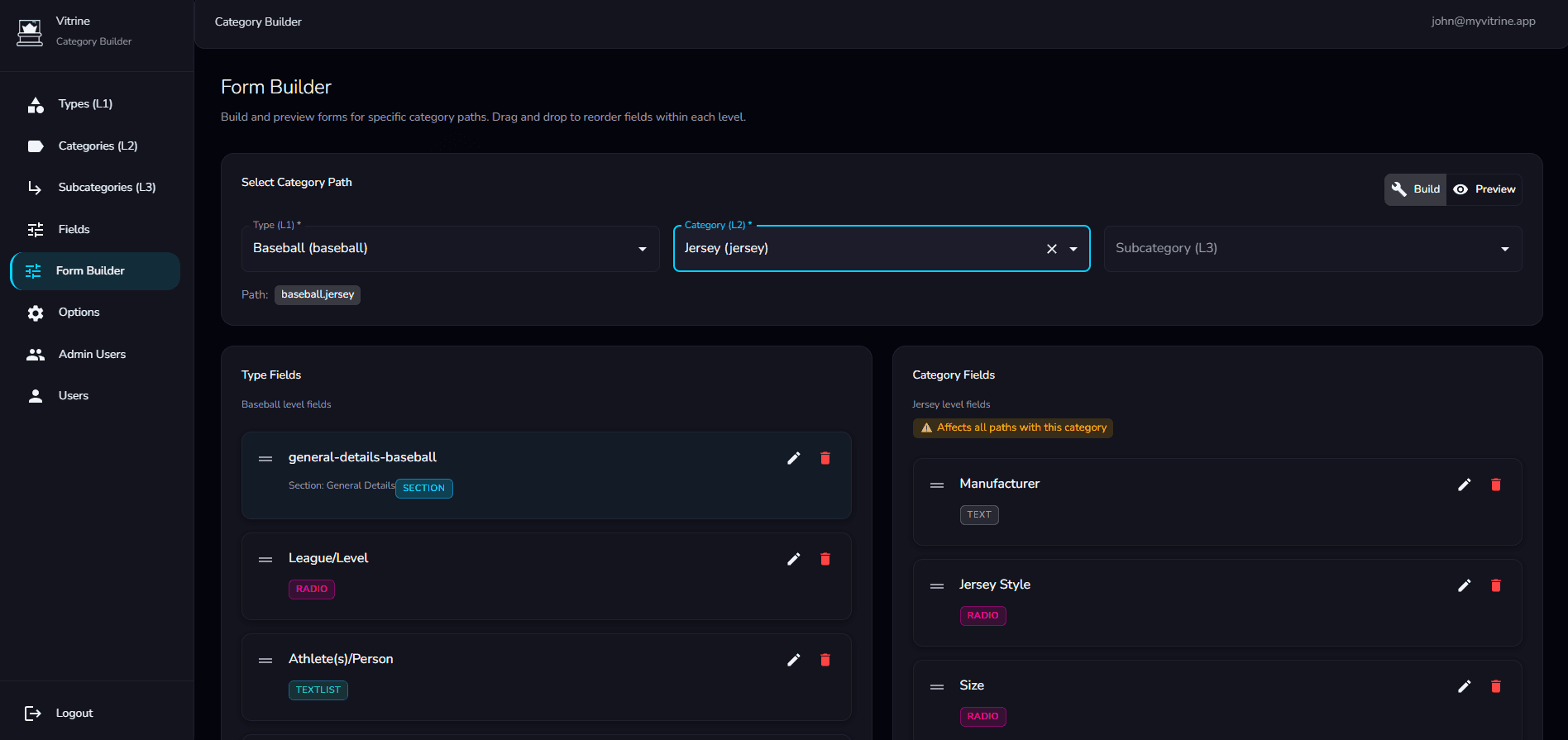
This is the unsexy but critical piece: how do admins manage the taxonomy that powers the entire platform? The system handles Types (L1), Categories (L2), Subcategories (L3), Fields, Options, and Visibility Rules. Complex information architecture that needed to be manageable without engineering support.
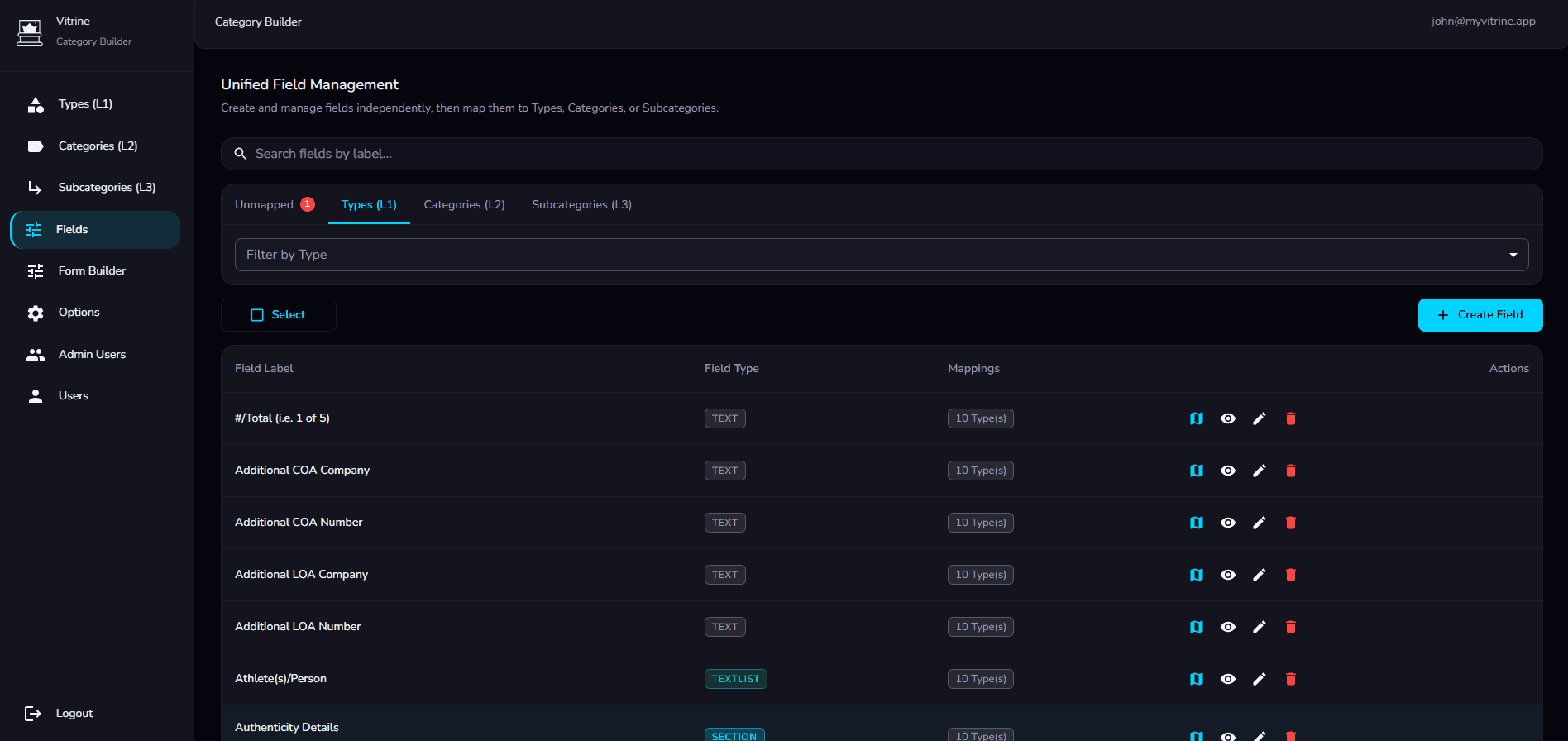
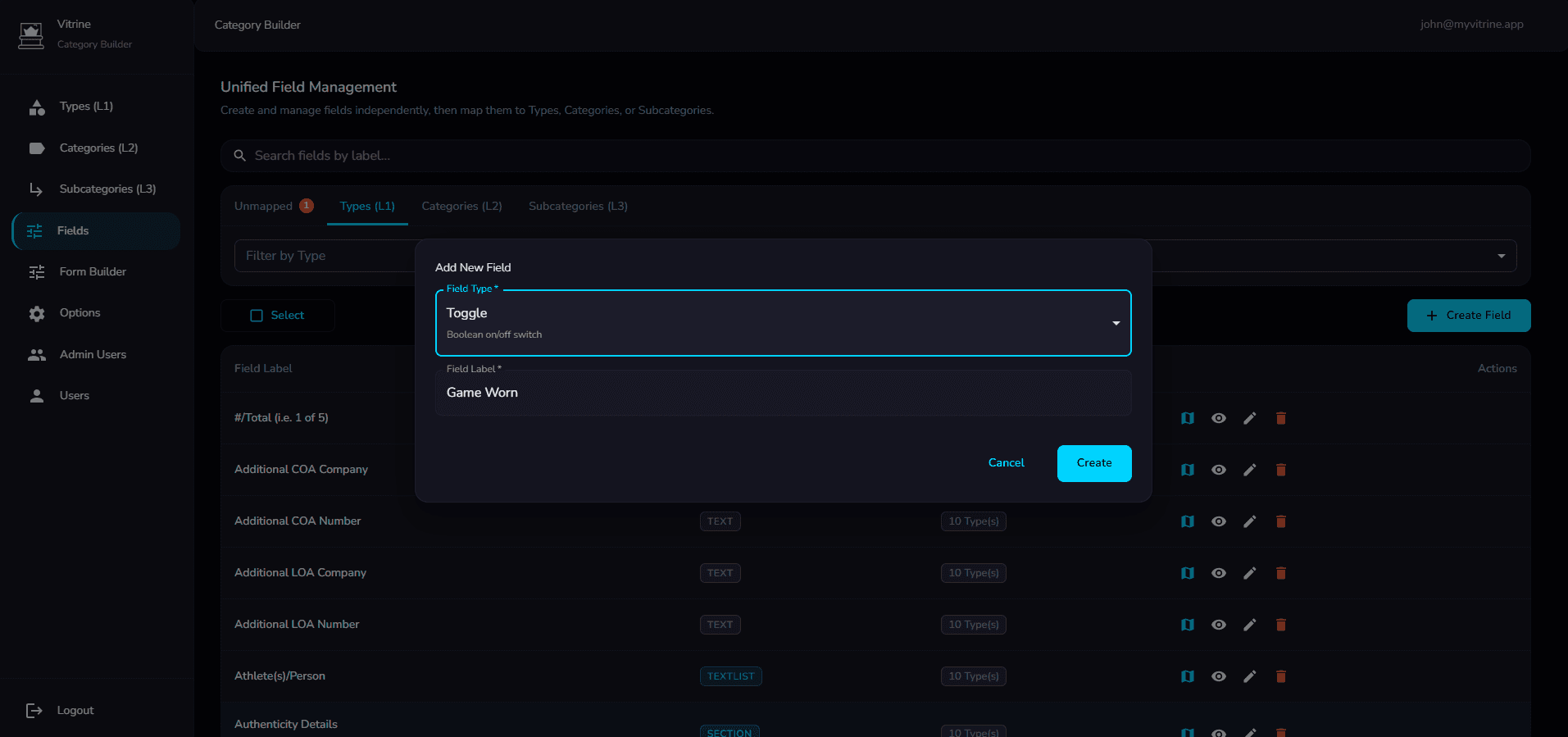
Left: Unified field library with type indicators and mapping counts. Right: Field creation modal with type selection.
05
Tradeoffs & Alternatives
Native vs. Cross-Platform
Started with design-to-code (React) for rapid prototyping, then refactored to React Native for production.
Design-to-code let me move fast in the exploration phase. Once design was locked, the refactor was more efficient than starting native from scratch.
Unified vs. Split Category Flows
A single upload flow handling both cards and memorabilia with conditional logic.
The mental models are too different. Shared entry point, then divergent flows. Unified at the data layer, but UX respects the differences.
Community: In-App vs. External
Pushing community features to Discord/Facebook and focusing purely on cataloging.
Fragmentation kills engagement. If collectors leave the app to talk, they'll eventually stay in Discord. Integrating community keeps the ecosystem sticky.
06
Technical Execution
This project wasn't just design — I built it.
FRONTEND
- • Consumer app: React Native
- • Marketing site: Next.js, Vercel
- • Admin PWA: React
BACKEND MIGRATION
- • Firebase → PostgreSQL
- • Redesigned data models
- • Zero service interruption
AI-NATIVE WORKFLOW
Every layer of this project ran through AI-assisted workflows:
This is how the scope expanded dramatically without the budget exploding.
07
Outcome
What Shipped
Full native React Native app — onboarding, cataloging, showcases, discovery, tracking, community, messaging, profiles
Complete marketing website — hero, features, social proof, conversion flow
Full admin PWA — taxonomy management, field library, form builder, visibility rules
Firebase → PostgreSQL migration, new relational data model
Pro tier subscription model (feature gating, paywall UX)
By the Numbers
Launching. Backend migration complete. Apps in final QA.
08
Reflection
What Worked
The scope expansion conversation
Instead of delivering a mediocre redesign of a flawed product, I pushed back and proposed a real solution. That conversation — "here's what you actually need, and here's how I can do it at your budget" — is a skill in itself.
The Form Builder architecture
Type → Category → Subcategory → Field model is flexible enough to handle any collectible type without engineering changes. Systems thinking that pays dividends long-term.
AI-native execution
I wouldn't have delivered this scope alone without the workflow I've built. Design-to-code, LLM-assisted refactoring, AI-driven backend work — it all compounded.
What I'd Do Differently
Earlier user testing on the Category Builder
Built based on my understanding of the data model, but didn't have direct access to the internal team who'll use it daily. In a longer engagement, I'd watch them use it and iterate.
More attention to bulk upload
Power collectors have thousands of items. Current flow is optimized for single-item adds. Bulk import is scoped but not fully designed — a gap for highest-value users.
This project started as a UI redesign and became a full platform rebuild.
Consumer app, marketing site, admin tooling, backend migration, and monetization strategy.
The client asked for a facelift. I gave them a foundation.
That's the job.